Materi 21: Workflow 2 - Membuat Laporan (Workflow Utama)
Ini adalah workflow utama dari sistem kita. Di sini, kita akan menggabungkan data dari berbagai sumber (API & Airtable), mengubah data tersebut, membuat file laporan (JSON & CSV), dan mengirim notifikasi via Email dan Discord.
Untuk mempermudah, kita akan membagi pembangunan workflow ini menjadi 3 Bagian.
Bagian 1: Mengambil & Menggabungkan Data
Tujuan bagian ini adalah menarik data penjualan dari ERP (via HTTP Request) dan data pelanggan dari Airtable (yang sudah kita perkaya di Workflow 1), lalu menggabungkannya.
Langkah-langkah:
-
HTTP Request Node: Ambil data dari API Perusahaan.
- Method: GET
- URL: Gunakan Dataset URL dari email Level 2 Anda.
- Authentication: Generic Credential Type > Header Auth.
- Credential: Buat baru, gunakan Header Auth Name & Value dari email Anda.
- Send Headers: Aktifkan (Toggle ON).
- Header Name:
unique_id| Value: Unique ID Anda dari email.
-
Airtable Node: Ambil data pelanggan.
- Table:
customers(tabel yang kita update di Workflow 1). - Operation: List.
- Table:
-
Merge Node: Gabungkan kedua sumber.
- Mode: Combine > Merge By Fields.
- Field Input 1 & 2:
customerID.
-
Sort Node: Urutkan data.
- Field:
orderPrice - Order: Descending (Terbesar ke terkecil).
- Field:
Kode Workflow Bagian 1 (JSON)
📄 Klik untuk menyalin JSON Bagian 1
{
  "nodes": [
    {
      "parameters": {},
      "id": "53c8dcdd-83a6-4a3c-ac03-d3ee3d49ec32",
      "name": "When clicking \"Execute workflow\"",
      "type": "n8n-nodes-base.manualTrigger",
      "typeVersion": 1,
      "position": [ -1152, 240 ]
    },
    {
      "parameters": {
        "url": "https://internal.users.n8n.cloud/webhook/level2-erp",
        "authentication": "genericCredentialType",
        "genericAuthType": "httpHeaderAuth",
        "sendHeaders": true,
        "headerParameters": {
          "parameters": [
            { "name": "api_key", "value": "j[vKYdY68H(:WFb" },
            { "name": "unique_id", "value": "ee139a3c81d52b9da914fd46f413acf2" }
          ]
        },
        "options": {}
      },
      "id": "cbf33d5c-1dfb-41bd-ab5e-dc7779829aba",
      "name": "HTTP Request",
      "type": "n8n-nodes-base.httpRequest",
      "typeVersion": 4.1,
      "position": [ -928, 144 ],
      "credentials": {
        "httpHeaderAuth": { "id": "N248dgARXFPjXLRA", "name": "Header Auth account" }
      }
    },
    {
      "parameters": {
        "operation": "search",
        "base": { "__rl": true, "value": "appzgiK89L202rUE3", "mode": "list", "cachedResultName": "Beginner Course", "cachedResultUrl": "https://airtable.com/appzgiK89L202rUE3" },
        "table": { "__rl": true, "value": "tblmECBN2BZsUHNjX", "mode": "list", "cachedResultName": "customers", "cachedResultUrl": "https://airtable.com/appzgiK89L202rUE3/tblmECBN2BZsUHNjX" },
        "options": {}
      },
      "id": "f975e689-5270-4c01-9197-8941bdd52074",
      "name": "Airtable",
      "type": "n8n-nodes-base.airtable",
      "typeVersion": 2,
      "position": [ -928, 336 ],
      "credentials": {
        "airtableTokenApi": { "id": "xwKF32ZJ0C3iAfpA", "name": "Airtable Personal Access Token account" }
      }
    },
    {
      "parameters": {
        "mode": "combine",
        "mergeByFields": { "values": [ { "field1": "customerID", "field2": "customerID" } ] },
        "options": {}
      },
      "id": "6a528401-b843-4bd4-abc8-761a3da4f444",
      "name": "Merge",
      "type": "n8n-nodes-base.merge",
      "typeVersion": 2.1,
      "position": [ -704, 240 ]
    },
    {
      "parameters": {
        "sortFieldsUi": { "sortField": [ { "fieldName": "orderPrice", "order": "descending" } ] },
        "options": {}
      },
      "id": "01cc4cd4-3c1b-40fc-a47e-7fcd7bc2583e",
      "name": "Sort",
      "type": "n8n-nodes-base.sort",
      "typeVersion": 1,
      "position": [ -480, 240 ]
    }
  ],
  "connections": {
    "When clicking \"Execute workflow\"": { "main": [ [ { "node": "HTTP Request", "type": "main", "index": 0 }, { "node": "Airtable", "type": "main", "index": 0 } ] ] },
    "HTTP Request": { "main": [ [ { "node": "Merge", "type": "main", "index": 0 } ] ] },
    "Airtable": { "main": [ [ { "node": "Merge", "type": "main", "index": 1 } ] ] },
    "Merge": { "main": [ [ { "node": "Sort", "type": "main", "index": 0 } ] ] },
    "Sort": { "main": [ [] ] }
  },
  "pinData": {},
  "meta": { "templateCredsSetupCompleted": true, "instanceId": "a612ce3732177191df67c49cdd165a9944332142dec2e0997de31bff5658a964" }
}
Kode di atas menggunakan kredensial akun saya. Jangan lupa untuk mengganti credential HTTP Request dan Airtable dengan milik Anda sendiri setelah melakukan paste.
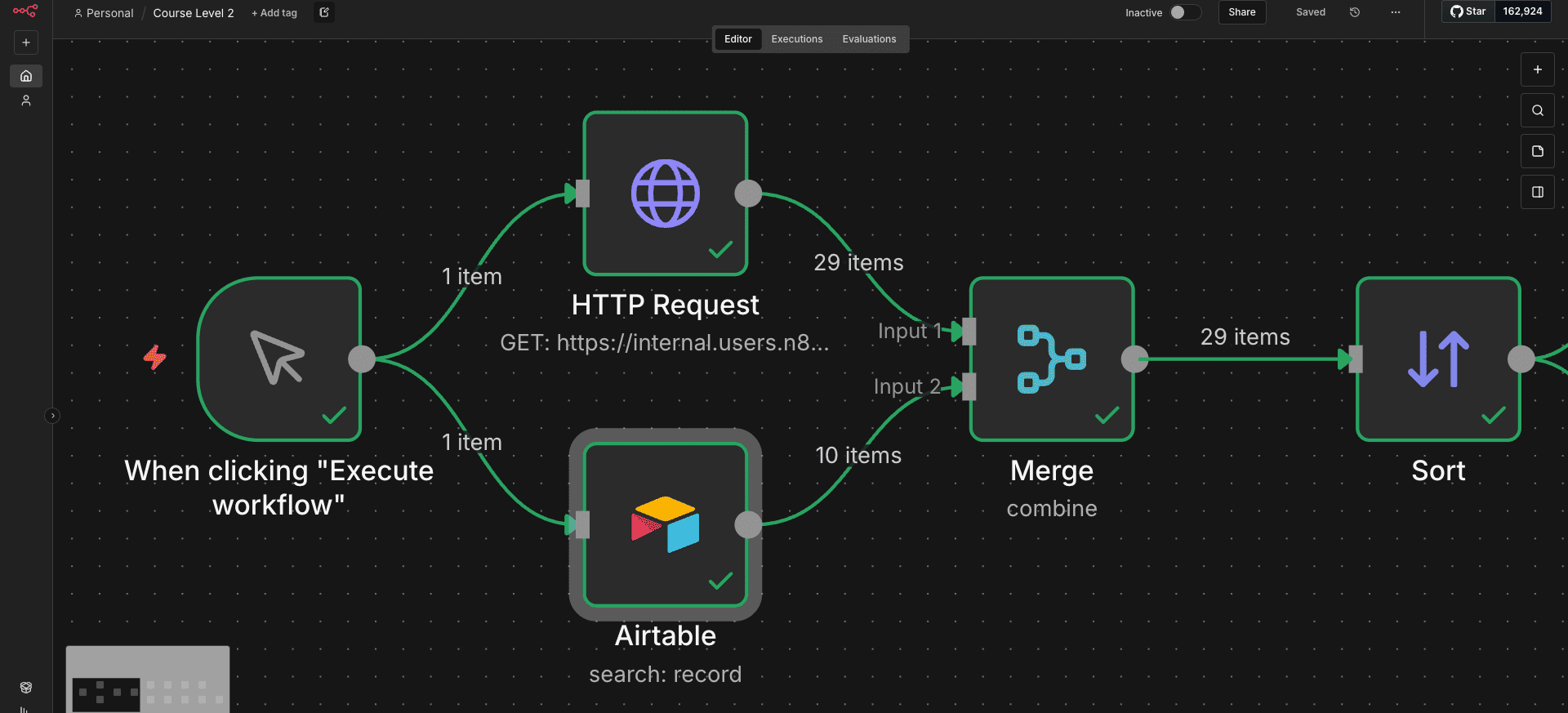
Flow Bagian 1: Mengambil & Menggabungkan Data
Kuis Bagian 1
❓ Siapa nama karyawan yang menangani pelanggan 1?
Cek output JSON di Merge Node untuk Customer ID 1. Lihat kolom
employeeName.
❓ Berapa harga pesanan tertinggi?
Karena kita mengurutkan secara Descending, cukup lihat
Item ke-1 di output Sort Node. Lihat nilai
orderPrice.
Bagian 2: Laporan Penjualan Regional (JSON)
Kita ingin memfilter hanya pesanan dari wilayah "Americas" dan mengirimkannya sebagai file JSON individu via Email.
Jika Anda menggunakan n8n Self-Hosted, ikuti langkah ini di Google Cloud Console:
- Buat Project baru & Aktifkan Gmail API di menu Library.
- Masuk ke menu Credentials.
- Klik Create Credentials > pilih OAuth client ID.
- Jika diminta "Configure Consent Screen":
- Pilih External > Isi App Name & Email.
- WAJIB: Tambahkan email Gmail Anda di bagian Test Users.
- Pilih Application Type: Web application.
-
Di Authorized redirect URIs, salin URL dari n8n Anda:
https://[DOMAIN_ANDA]/rest/oauth2-credential/callback - Klik Create, lalu salin Client ID & Client Secret ke n8n.
Langkah-langkah:
-
IF Node: Filter data.
- Condition:
regionEqual toAmericas.
- Condition:
-
Convert to File Node: Buat file biner.
- Operation: Convert to JSON.
- Mode: Each Item (Satu file per pesanan).
- File Name:
report_orderID_{{ $json.orderID }}.json
-
Gmail Node: Kirim email.
- Resource: Message > Send.
- To: Alamat email Anda sendiri.
- Subject: "Laporan Regional".
- Attachments: Aktifkan, dan isi
Property Namedengandata.
-
Discord Node: Notifikasi ke channel n8n.
- Webhook URL: Gunakan URL dari email Level 2 Anda.
- Text:
I sent the file using email with the label ID {{ $json.labelIds[0] }}. My ID: [ID_ANDA]
Kode Workflow Bagian 2 (JSON)
Salin kode ini. Hubungkan Input node "If" ke Output node "Sort" dari Bagian 1.
📄 Klik untuk menyalin JSON Bagian 2
{
  "nodes": [
    {
      "parameters": {
        "sendTo": "naufal97nabila@gmail.com",
        "subject": "Your TPS Reports",
        "emailType": "text",
        "message": "Please find your TPS report attached.",
        "options": { "attachmentsUi": { "attachmentsBinary": [ {} ] } }
      },
      "id": "9ca84fac-9c5d-4f08-9579-5cf9398460aa",
      "name": "Gmail",
      "type": "n8n-nodes-base.gmail",
      "typeVersion": 2.1,
      "position": [ 176, 144 ],
      "webhookId": "8c60abc3-e84e-4acb-9731-ea9b0852253f",
      "credentials": {
        "gmailOAuth2": { "id": "OLkxnVcb9kIyGtYs", "name": "Gmail account" }
      }
    },
    {
      "parameters": {
        "conditions": {
          "options": { "caseSensitive": true, "leftValue": "", "typeValidation": "strict", "version": 1 },
          "conditions": [
            {
              "id": "d3afe65c-7c80-4caa-9d1c-33c62fbc2197",
              "leftValue": "={{ $json.region }}",
              "rightValue": "Americas",
              "operator": { "type": "string", "operation": "equals", "name": "filter.operator.equals" }
            }
          ],
          "combinator": "and"
        },
        "options": {}
      },
      "id": "b1021137-70fc-4a48-b04b-482ad56c2200",
      "name": "If",
      "type": "n8n-nodes-base.if",
      "typeVersion": 2,
      "position": [ -272, 144 ]
    },
    {
      "parameters": {
        "operation": "toJson",
        "mode": "each",
        "options": { "fileName": "=report_orderID_{{ $('If').item.json.orderID }}.json" }
      },
      "id": "c39cf045-1e1c-44aa-a884-879267dd73b0",
      "name": "Convert to File",
      "type": "n8n-nodes-base.convertToFile",
      "typeVersion": 1.1,
      "position": [ -48, 144 ]
    },
    {
      "parameters": {
        "authentication": "webhook",
        "content": "I sent the file using email with the label ID  and wrote the binary file {file name}. My ID: 123",
        "options": {}
      },
      "id": "f807641f-70f2-4050-894a-22a5c8f99b88",
      "name": "Discord",
      "type": "n8n-nodes-base.discord",
      "typeVersion": 2,
      "position": [ 400, 144 ],
      "webhookId": "46d90310-2046-4c8d-a2a3-575c718e079f",
      "credentials": {
        "discordWebhookApi": { "id": "D6qu4sPWQkJyyIyZ", "name": "Discord Webhook account" }
      }
    }
  ],
  "connections": {
    "Gmail": { "main": [ [ { "node": "Discord", "type": "main", "index": 0 } ] ] },
    "If": { "main": [ [ { "node": "Convert to File", "type": "main", "index": 0 } ] ] },
    "Convert to File": { "main": [ [ { "node": "Gmail", "type": "main", "index": 0 } ] ] }
  },
  "pinData": {},
  "meta": { "templateCredsSetupCompleted": true, "instanceId": "a612ce3732177191df67c49cdd165a9944332142dec2e0997de31bff5658a964" }
}

Flow Bagian 2: Laporan Regional (Cabang dari Sort Node)
Kuis Bagian 2
❓ Ada berapa pesanan di wilayah Americas?
Cek jumlah item di cabang True pada node IF.
❓ Berapa item yang dikembalikan node Convert to File?
Jumlahnya harus sama dengan jumlah pesanan Americas. Cek output node tersebut.
Bagian 3: Laporan Total Penjualan (CSV)
Kita juga ingin memproses semua pesanan (dari Bagian 1, SETELAH Sort, SEBELUM If), mengelompokkannya menjadi batch, dan membuat ringkasan CSV.
Langkah-langkah:
-
Loop Over Items Node: Pecah menjadi batch.
- Hubungkan dari Sort Node.
- Batch Size:
5.
-
Edit Fields (Set) Node: Bersihkan data.
-
Hanya simpan:
customerEmail,region,customerSince,orderPrice.
-
Hanya simpan:
-
Date & Time Node: Format tanggal.
- Date:
customerSince. - To Format:
MM/DD/YYYY.
- Date:
-
Convert to File Node: Buat CSV.
- Operation: Convert to CSV.
-
File Name Expression:
{{ $runIndex > 0 ? 'file_low_orders' : 'file_high_orders' }} - (Logika: Karena data diurutkan besar-ke-kecil, Batch 1 (Index 0) adalah "High", batch berikutnya adalah "Low")
-
Discord Node: Notifikasi.
-
Text:
I created the spreadsheet {{ $json.fileName }}. My ID: [ID_ANDA].
-
Text:
- Loop Back: Hubungkan output Discord KEMBALI ke input Loop Over Items.
Kode Workflow Bagian 3 (JSON)
Salin kode ini. Hubungkan Input node "Loop Over Items" ke Output node "Sort" dari Bagian 1.
📄 Klik untuk menyalin JSON Bagian 3
{
  "nodes": [
    {
      "parameters": { "batchSize": 5, "options": {} },
      "id": "86ae346b-7b02-4540-94df-eff6b2b6751b",
      "name": "Loop Over Items",
      "type": "n8n-nodes-base.splitInBatches",
      "typeVersion": 3,
      "position": [ -272, 336 ]
    },
    {
      "parameters": {
        "assignments": {
          "assignments": [
            { "id": "ce839b80-c50d-48f5-9a24-bb2df6fdd2ff", "name": "customerEmail", "value": "={{ $json.customerEmail }}", "type": "string" },
            { "id": "0c613366-3808-45a2-89cc-b34c7b9f3fb7", "name": "region", "value": "={{ $json.region }}", "type": "string" },
            { "id": "0f19a88c-deb0-4119-8965-06ed62a840b2", "name": "customerSince", "value": "={{ $json.customerSince }}", "type": "string" },
            { "id": "a7e890d6-86af-4839-b5df-d2a4efe923f7", "name": "orderPrice", "value": "={{ $json.orderPrice }}", "type": "number" }
          ]
        },
        "options": {}
      },
      "id": "ab7259aa-b9a9-41c0-a80f-fad31e0ca87d",
      "name": "Edit Fields",
      "type": "n8n-nodes-base.set",
      "typeVersion": 3.3,
      "position": [ -48, 336 ]
    },
    {
      "parameters": {
        "operation": "formatDate",
        "date": "={{ $json.customerSince }}",
        "options": { "includeInputFields": true }
      },
      "id": "5bd9efc1-30f8-4d0b-bdf0-f6afb0b1b917",
      "name": "Date & Time",
      "type": "n8n-nodes-base.dateTime",
      "typeVersion": 2,
      "position": [ 176, 336 ]
    },
    {
      "parameters": {
        "options": { "fileName": "={{$runIndex > 0 ? 'file_low_orders':'file_high_orders'}}" }
      },
      "id": "a3551e0a-db7c-48ac-80c9-9f83b3fd16f4",
      "name": "Convert to File1",
      "type": "n8n-nodes-base.convertToFile",
      "typeVersion": 1.1,
      "position": [ 400, 336 ]
    },
    {
      "parameters": {
        "authentication": "webhook",
        "content": "I created the spreadsheet {file name}. My ID: 123",
        "options": {}
      },
      "id": "a3e0769a-1b24-432b-a108-346278db4e5f",
      "name": "Discord1",
      "type": "n8n-nodes-base.discord",
      "typeVersion": 2,
      "position": [ 624, 336 ],
      "credentials": {
        "discordWebhookApi": { "id": "D6qu4sPWQkJyyIyZ", "name": "Discord Webhook account" }
      }
    }
  ],
  "connections": {
    "Loop Over Items": { "main": [ [], [ { "node": "Edit Fields", "type": "main", "index": 0 } ] ] },
    "Edit Fields": { "main": [ [ { "node": "Date & Time", "type": "main", "index": 0 } ] ] },
    "Date & Time": { "main": [ [ { "node": "Convert to File1", "type": "main", "index": 0 } ] ] },
    "Convert to File1": { "main": [ [ { "node": "Discord1", "type": "main", "index": 0 } ] ] },
    "Discord1": { "main": [ [ { "node": "Loop Over Items", "type": "main", "index": 0 } ] ] }
  },
  "pinData": {},
  "meta": { "templateCredsSetupCompleted": true, "instanceId": "a612ce3732177191df67c49cdd165a9944332142dec2e0997de31bff5658a964" }
}

Flow Bagian 3: Laporan Total Penjualan (Cabang dari Sort Node)
Kuis Bagian 3
❓ Apa format tanggal untuk customer 7?
Cek output Date & Time node. Cari item dengan customerID 7 dan baca format tanggal barunya.
❓ Berapa item yang dikembalikan node Convert to File (CSV)?
Karena Convert to CSV (tanpa opsi 'Split into items') menggabungkan semua item input menjadi SATU file, maka ia seharusnya mengembalikan 1 Item (yang berisi file biner tersebut).
Kode Workflow Lengkap (Full)
Ini adalah kode gabungan dari Bagian 1, 2, dan 3 yang sudah saling terhubung (Node Sort terhubung ke IF dan Loop). Gunakan ini jika Anda ingin langsung melihat hasil akhirnya.
📄 Klik untuk menyalin JSON FULL (Bagian 1 + 2 + 3)
{
  "nodes": [
    { "parameters": {}, "id": "53c8dcdd-83a6-4a3c-ac03-d3ee3d49ec32", "name": "When clicking \"Execute workflow\"", "type": "n8n-nodes-base.manualTrigger", "typeVersion": 1, "position": [-1152, 240] },
    { "parameters": { "url": "https://internal.users.n8n.cloud/webhook/level2-erp", "authentication": "genericCredentialType", "genericAuthType": "httpHeaderAuth", "sendHeaders": true, "headerParameters": { "parameters": [{ "name": "api_key", "value": "j[vKYdY68H(:WFb" }, { "name": "unique_id", "value": "ee139a3c81d52b9da914fd46f413acf2" }] }, "options": {} }, "id": "cbf33d5c-1dfb-41bd-ab5e-dc7779829aba", "name": "HTTP Request", "type": "n8n-nodes-base.httpRequest", "typeVersion": 4.1, "position": [-928, 144], "credentials": { "httpHeaderAuth": { "id": "N248dgARXFPjXLRA", "name": "Header Auth account" } } },
    { "parameters": { "operation": "search", "base": { "__rl": true, "value": "appzgiK89L202rUE3", "mode": "list", "cachedResultName": "Beginner Course", "cachedResultUrl": "https://airtable.com/appzgiK89L202rUE3" }, "table": { "__rl": true, "value": "tblmECBN2BZsUHNjX", "mode": "list", "cachedResultName": "customers", "cachedResultUrl": "https://airtable.com/appzgiK89L202rUE3/tblmECBN2BZsUHNjX" }, "options": {} }, "id": "f975e689-5270-4c01-9197-8941bdd52074", "name": "Airtable", "type": "n8n-nodes-base.airtable", "typeVersion": 2, "position": [-928, 336], "credentials": { "airtableTokenApi": { "id": "xwKF32ZJ0C3iAfpA", "name": "Airtable Personal Access Token account" } } },
    { "parameters": { "mode": "combine", "mergeByFields": { "values": [{ "field1": "customerID", "field2": "customerID" }] }, "options": {} }, "id": "6a528401-b843-4bd4-abc8-761a3da4f444", "name": "Merge", "type": "n8n-nodes-base.merge", "typeVersion": 2.1, "position": [-704, 240] },
    { "parameters": { "sortFieldsUi": { "sortField": [{ "fieldName": "orderPrice", "order": "descending" }] }, "options": {} }, "id": "01cc4cd4-3c1b-40fc-a47e-7fcd7bc2583e", "name": "Sort", "type": "n8n-nodes-base.sort", "typeVersion": 1, "position": [-480, 240] },
    { "parameters": { "sendTo": "naufal97nabila@gmail.com", "subject": "Your TPS Reports", "emailType": "text", "message": "Please find your TPS report attached.", "options": { "attachmentsUi": { "attachmentsBinary": [{}] } } }, "id": "9ca84fac-9c5d-4f08-9579-5cf9398460aa", "name": "Gmail", "type": "n8n-nodes-base.gmail", "typeVersion": 2.1, "position": [176, 144], "credentials": { "gmailOAuth2": { "id": "OLkxnVcb9kIyGtYs", "name": "Gmail account" } } },
    { "parameters": { "conditions": { "options": { "caseSensitive": true, "leftValue": "", "typeValidation": "strict", "version": 1 }, "conditions": [{ "id": "d3afe65c-7c80-4caa-9d1c-33c62fbc2197", "leftValue": "={{ $json.region }}", "rightValue": "Americas", "operator": { "type": "string", "operation": "equals", "name": "filter.operator.equals" } }], "combinator": "and" }, "options": {} }, "id": "b1021137-70fc-4a48-b04b-482ad56c2200", "name": "If", "type": "n8n-nodes-base.if", "typeVersion": 2, "position": [-272, 144] },
    { "parameters": { "operation": "toJson", "mode": "each", "options": { "fileName": "=report_orderID_{{ $('If').item.json.orderID }}.json" } }, "id": "c39cf045-1e1c-44aa-a884-879267dd73b0", "name": "Convert to File", "type": "n8n-nodes-base.convertToFile", "typeVersion": 1.1, "position": [-48, 144] },
    { "parameters": { "authentication": "webhook", "content": "I sent the file using email with the label ID  and wrote the binary file {file name}. My ID: 123", "options": {} }, "id": "f807641f-70f2-4050-894a-22a5c8f99b88", "name": "Discord", "type": "n8n-nodes-base.discord", "typeVersion": 2, "position": [400, 144], "credentials": { "discordWebhookApi": { "id": "D6qu4sPWQkJyyIyZ", "name": "Discord Webhook account" } } },
    { "parameters": { "batchSize": 5, "options": {} }, "id": "86ae346b-7b02-4540-94df-eff6b2b6751b", "name": "Loop Over Items", "type": "n8n-nodes-base.splitInBatches", "typeVersion": 3, "position": [-272, 336] },
    { "parameters": { "assignments": { "assignments": [{ "id": "ce839b80-c50d-48f5-9a24-bb2df6fdd2ff", "name": "customerEmail", "value": "={{ $json.customerEmail }}", "type": "string" }, { "id": "0c613366-3808-45a2-89cc-b34c7b9f3fb7", "name": "region", "value": "={{ $json.region }}", "type": "string" }, { "id": "0f19a88c-deb0-4119-8965-06ed62a840b2", "name": "customerSince", "value": "={{ $json.customerSince }}", "type": "string" }, { "id": "a7e890d6-86af-4839-b5df-d2a4efe923f7", "name": "orderPrice", "value": "={{ $json.orderPrice }}", "type": "number" }] }, "options": {} }, "id": "ab7259aa-b9a9-41c0-a80f-fad31e0ca87d", "name": "Edit Fields", "type": "n8n-nodes-base.set", "typeVersion": 3.3, "position": [-48, 336] },
    { "parameters": { "operation": "formatDate", "date": "={{ $json.customerSince }}", "options": { "includeInputFields": true } }, "id": "5bd9efc1-30f8-4d0b-bdf0-f6afb0b1b917", "name": "Date & Time", "type": "n8n-nodes-base.dateTime", "typeVersion": 2, "position": [176, 336] },
    { "parameters": { "options": { "fileName": "={{$runIndex > 0 ? 'file_low_orders':'file_high_orders'}}" } }, "id": "a3551e0a-db7c-48ac-80c9-9f83b3fd16f4", "name": "Convert to File1", "type": "n8n-nodes-base.convertToFile", "typeVersion": 1.1, "position": [400, 336] },
    { "parameters": { "authentication": "webhook", "content": "I created the spreadsheet {file name}. My ID: 123", "options": {} }, "id": "a3e0769a-1b24-432b-a108-346278db4e5f", "name": "Discord1", "type": "n8n-nodes-base.discord", "typeVersion": 2, "position": [624, 336], "credentials": { "discordWebhookApi": { "id": "D6qu4sPWQkJyyIyZ", "name": "Discord Webhook account" } } }
  ],
  "connections": {
    "When clicking \"Execute workflow\"": { "main": [[{ "node": "HTTP Request", "type": "main", "index": 0 }, { "node": "Airtable", "type": "main", "index": 0 }]] },
    "HTTP Request": { "main": [[{ "node": "Merge", "type": "main", "index": 0 }]] },
    "Airtable": { "main": [[{ "node": "Merge", "type": "main", "index": 1 }]] },
    "Merge": { "main": [[{ "node": "Sort", "type": "main", "index": 0 }]] },
    "Sort": { "main": [[{ "node": "If", "type": "main", "index": 0 }, { "node": "Loop Over Items", "type": "main", "index": 0 }]] },
    "Gmail": { "main": [[{ "node": "Discord", "type": "main", "index": 0 }]] },
    "If": { "main": [[{ "node": "Convert to File", "type": "main", "index": 0 }]] },
    "Convert to File": { "main": [[{ "node": "Gmail", "type": "main", "index": 0 }]] },
    "Loop Over Items": { "main": [[], [{ "node": "Edit Fields", "type": "main", "index": 0 }]] },
    "Edit Fields": { "main": [[{ "node": "Date & Time", "type": "main", "index": 0 }]] },
    "Date & Time": { "main": [[{ "node": "Convert to File1", "type": "main", "index": 0 }]] },
    "Convert to File1": { "main": [[{ "node": "Discord1", "type": "main", "index": 0 }]] },
    "Discord1": { "main": [[{ "node": "Loop Over Items", "type": "main", "index": 0 }]] }
  },
  "pinData": {},
  "meta": { "templateCredsSetupCompleted": true, "instanceId": "a612ce3732177191df67c49cdd165a9944332142dec2e0997de31bff5658a964" }
}

Flow Keseluruhan: Bagian 1, 2, & 3
Ringkasan
Selamat! Anda telah berhasil membangun workflow kompleks yang melakukan penggabungan data, pemfilteran kondisi, pembuatan file (Biner), pengiriman email, dan looping dengan batching. Ini adalah inti dari teknik otomatisasi!